Warehouse Asset Tag Placement and Scanning Guide
Connect rack, location and reusable-asset IDs to the warehouse record, then plan the scan path, mounting and data handoff.
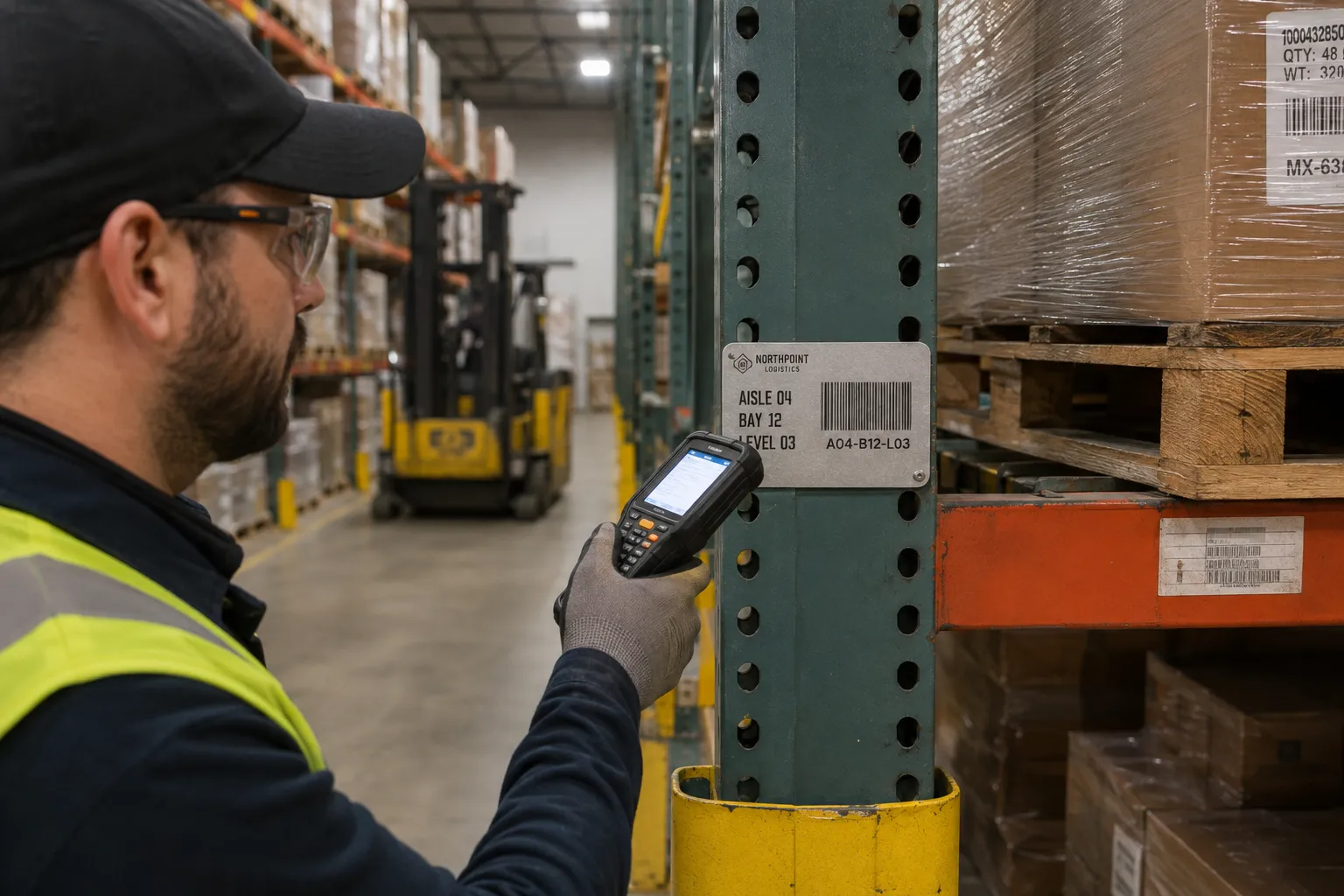
Application snapshot
Warehouse placement and scanning snapshot
Define the warehouse record and normal scan path before selecting the tag size, material or mounting method.
Selected customer brands
These approved logos are separate from the planning image and parameters. No customer result is claimed here.




Parameters to confirm
Send the measured conditions and source data with the RFQ. The written quote and Proof confirm the final Product, specification and price.
- Warehouse targets
- Rack uprights, bays, bins, carts, reusable totes, scanner cradles and durable warehouse equipment.
- ID model
- State whether each tag identifies a fixed location or a movable asset. Do not mix the two numbering rules.
- Scan path
- Device, approach direction, viewing height, expected distance and the stock or guards that may block the code.
- Surface
- Paint, powder coating, texture, dust, oil and the clean contact area available for the proposed tag.
- Mounting
- Adhesive after a surface test, or approved mechanical mounting that clears rack holes and installed hardware.
- Data structure
- Aisle, bay, level, asset ID, encoded value and visible fallback text in separate fields.
- Starting materials
- Anodized aluminum or polyester, selected after the surface, service period and handling path are known.
- Exposure to report
- Cleaning, condensation, abrasion, repeated handling, pallet contact and impact risk at the planned location.
Warehouse asset tag placement starts with one distinction: are you identifying a fixed location or a movable asset? A rack upright, storage bay, cart, tote and piece of equipment should not share an ID structure unless the warehouse record treats them the same way.
Once the record is defined, plan the scan path. The tag needs a stable position, enough space for the selected code and a surface that suits the proposed mounting method.
Separate location IDs from movable-asset IDs
A location ID tells staff where inventory belongs. An asset ID identifies the rack, cart, reusable tote, scanner cradle or other item itself. Mixing the two creates problems when a cart moves or a rack layout changes.
Use a naming structure that staff can read and the warehouse system can store without reformatting it. A location such as A04-B12-L03 can represent aisle, bay and level, but the exact segments should follow the existing warehouse map. Do not invent a second naming system for the tags.
For movable assets, use a stable serial or asset ID that does not contain a temporary location. The current aisle, department or user belongs in the record. The visible tag remains useful after the asset moves.
Disposable carton, pallet and shipping labels may follow a different printing and replacement process. This guide focuses on durable identifiers for locations and reusable assets, not short-life stock labels.
Plan placement from the normal scan path
Walk the aisle with the scanner or device that staff will use. A tag that is visible from an empty aisle can disappear behind pallets, stretch wrap or staged stock during normal work.
| Warehouse target | Placement question | Data and mounting check |
|---|---|---|
| Rack upright or fixed bay | Can staff scan it from the direction they approach? | Location code, viewing height, rack holes, beam hardware and guard clearance |
| Shelf, bin or storage face | Will stock cover the tag or change the viewing angle? | Label area, replacement process and whether the surface is removable |
| Cart or reusable tote | Which part stays with the asset and avoids repeated impact? | Stable asset ID, surface material, cleaning and handling path |
| Forklift or mobile equipment | Can the code be reached without placing staff near moving equipment? | Approved parked scan position, service panels and mounting clearance |
| Coated or textured rack | Is there enough clean contact area for adhesive? | Powder coat, texture, oil, dust and sample-test result |
Keep the tag clear of beam clips, adjustment holes, fasteners, moving interfaces and areas that take direct forklift or pallet contact. If a tag must sit behind a guard or above normal reach, confirm that the scanner can still read it at the planned distance.
Choose the code from the warehouse system
Use a barcode when the operation already has scanners, a defined symbology and a controlled data format. Use a QR code when staff need a compatible phone or 2D imager to open a location, asset or instruction record. A visible location or asset ID should appear with either code.
The code value does not need to repeat every printed word. Keep encoded data short enough for the available tag size and the selected scanner. A short record key often gives more layout room than a long web address or a string containing several descriptions.
Prepare one row per tag. Keep the visible ID, barcode value, QR destination and printed description in separate columns. Preserve leading zeros, remove unintended spaces and check duplicates before the Proof. The data preparation guide provides a clean Excel and CSV handoff structure.
Compare material and mounting after the route is known
The current Warehouse and Inventory Asset Tags Category includes anodized aluminum and polyester starting points. Thin film can suit suitable indoor surfaces where a low profile is preferred. Aluminum provides a metal face with adhesive or hole-mount choices in the current Product range.
Do not select adhesive from the phrase warehouse rack alone. Rack uprights can be painted, powder coated, textured, dusty or exposed to impact and cleaning. Send a close surface photo and test the exact tag on the actual rack when adhesion is uncertain.
Mechanical mounting needs an approved hole location and fastener plan. Rack perforations are not automatically the correct centers for a tag. Confirm the hole spacing and make sure the plate does not obstruct adjustment points or installed hardware.
The written quote and Proof confirm the final Product, size, material, marking and mounting. Displayed quantity tiers remain reference prices for the listed specifications.
Planning example: a scannable rack location
The image on this page shows a barcode plate positioned on a rack upright with aisle, bay and level text. The layout illustrates a useful fallback: staff can read the location even if the scanner is unavailable or the code cannot be captured from the current angle.
The Northpoint Logistics mark is fictional. The image does not show an IronMarks customer, warehouse deployment or measured scan result.
Build the RFQ from the warehouse map
Send a sample of the current location or asset list, not only a count. The file should show the ID structure and which fields must be printed or encoded. Add photos of each main surface type and state whether the tag identifies a location or an asset.
Include:
- rack, bin, cart, tote or equipment type;
- quantity by tag type and any spare quantity;
- maximum tag size and preferred viewing distance;
- barcode symbology or QR destination format;
- scanner or device type;
- surface material, coating, texture and cleaning method;
- adhesive or mechanical mounting preference;
- expected contact, abrasion, condensation or impact conditions;
- numbering rules, leading zeros and skipped ranges.
Request samples for coated, textured or repeatedly cleaned surfaces. Scan the sample from the real aisle position with the real device before approving the full run.
Evidence basis
This A0 guide uses the current catalog and application-planning rules. It does not claim a customer deployment, a universal scan distance or a tested adhesive result. Current production and quality-control information is available through the manufacturing, quality control and evidence pages.
Frequently asked questions
- Where should a warehouse asset tag be placed?
- Place it on a stable part of the rack, location or reusable asset that stays visible in the normal scan path. Keep it clear of beam clips, fasteners, removable panels, impact guards and areas hidden by stored goods.
- Should warehouse locations use barcodes or QR codes?
- Use the code already supported by the warehouse system and scanner fleet. A barcode fits a defined scanner process. A QR code can open a permitted record from a compatible phone or 2D imager. Keep visible location text as a fallback.
- Can the same tag be used for racks, carts and stock labels?
- Not automatically. A fixed rack location, a reusable cart and a disposable carton have different service periods, surfaces and replacement rules. Define what is being identified before choosing the Product.