How to Prepare Asset Tag Data in Excel or CSV
Structure Excel or CSV variable data for serialized, barcode or QR asset tags without losing leading zeros, rows or encoded values.
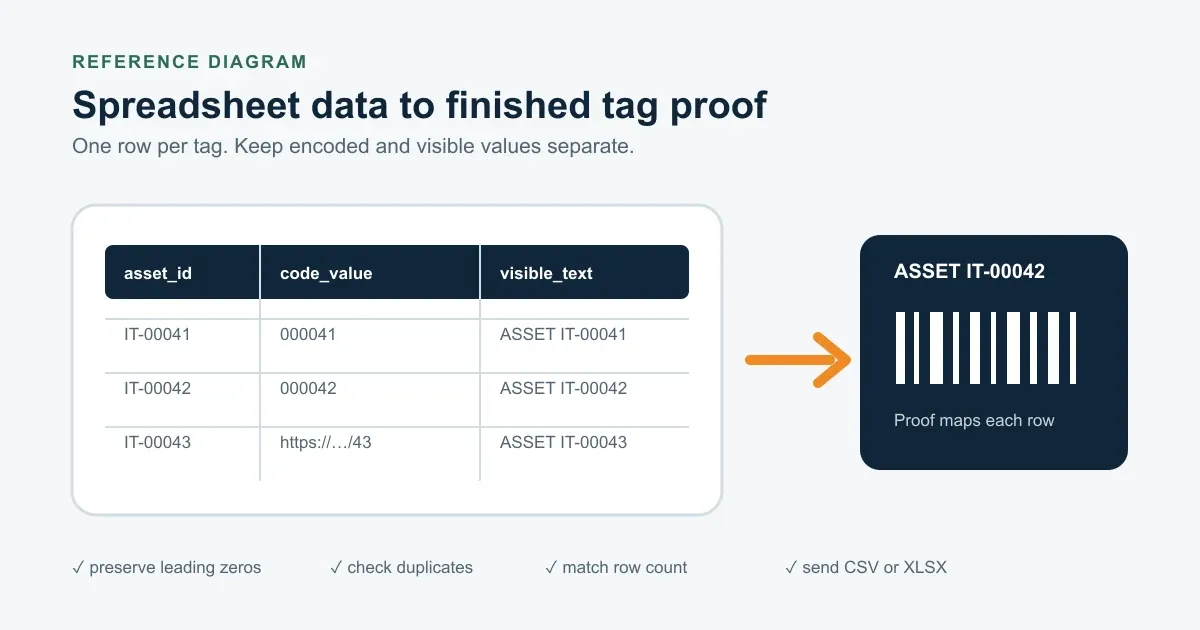
Steps
- Use one row for each finished tag. Match the number of data rows to the quoted quantity. Keep the first row for clear column headings and remove merged cells.
- Separate identifiers, encoded values and visible text. Use distinct columns such as asset_id, code_value and visible_text so the proof can map each field without guessing.
- Preserve leading zeros and fixed formats. Format serial and code columns as text. Confirm prefixes, suffixes, digit counts, skipped values and increments.
- Check blanks, duplicates and row count. Filter the final data for missing encoded values, duplicate IDs and extra rows before sending the file.
- Confirm the code workflow. Name the barcode format when your system requires one, or provide the exact QR URL or text. Keep a separate human-readable value when staff need manual lookup.
- Send CSV or XLSX and review the proof. Upload the final data with the material, size, quantity and mounting specification. Compare the proof with the source file before approval.
Preparing asset tags from Excel is a data-control task. The goal is one unambiguous row for every finished tag, with no lost zeros, duplicate identifiers or mixed encoded and printed values.
IronMarks accepts CSV and XLSX files. Choose the format that preserves your data cleanly and is easiest for your team to review.
Build one row per finished tag
Use the first row for column headings. Each following row should describe one finished tag, not one asset type or one batch.
| asset_id | code_value | visible_text | department |
|---|---|---|---|
| IT-00041 | 000041 | ASSET IT-00041 | IT |
| IT-00042 | 000042 | ASSET IT-00042 | IT |
| IT-00043 | https://example.com/assets/43 | ASSET IT-00043 | IT |
Your real headings can match the asset system. The important point is separation. An asset_id can name the record, code_value can hold what the barcode or QR code encodes, and visible_text can hold what staff read on the tag.
Keep serial and code fields as text
Spreadsheet software can remove leading zeros, convert long values to scientific notation or reinterpret dates. Format serial and code columns as text before entering or importing the data.
Check the final saved file, not only the working sheet. Confirm that 000042 is still 000042, prefixes and suffixes remain intact, and the fixed digit count matches the required sequence.
Check the file before upload
Run four simple checks:
- The number of data rows matches the requested quantity.
- Required ID and encoded-value cells are not blank.
- IDs and encoded values do not contain unintended duplicates.
- Start, end, increment, skipped values and prefixes match the approved numbering plan.
Leave an unused barcode or QR column blank rather than combining several meanings in one cell.
Specify barcode and QR values directly
Do not assume a barcode format when the asset system requires a specific symbology. Name it in the RFQ. For a QR code, provide the exact URL or text, including https:// when it is part of the destination.
The barcode, QR code and RFID comparison can help settle the read workflow before the file is final. A barcode value, QR destination and printed fallback number should remain separate when they are not identical.
Review the proof against the source file
The digital proof should be checked for size, orientation, spelling, logo placement, field mapping, sample records, serial order and mounting details. It does not prove how a physical code will behave on every installed asset.
If scan performance in the real location is critical, request a sample and test it with the actual scanner or phone. When the file is ready, send it with a serialized asset tag or barcode asset tag RFQ. For a compact 1D-barcode reference, review the 0.5 x 1.5 in aluminum barcode asset tag, or use the artwork and data upload page.
Frequently asked questions
- Should I send CSV or XLSX?
- IronMarks accepts both CSV and XLSX for variable data. Use clear column headings and one finished tag per data row. Remove merged cells before upload.
- How do I preserve leading zeros in Excel?
- Format serial and encoded-value columns as text before entering or importing the data. Check the exported file to confirm values such as 000042 have not become 42.
- Does the digital proof replace a physical scan test?
- No. The proof is used to check layout, source values, sequence, spelling and mounting details. If installed scan behavior is critical, test a representative physical sample with the actual scanner or phone.