IT Asset Tag Placement and Numbering Guide
Choose a stable tag location, code workflow and numbering structure for laptops, docks, monitors, servers and other IT assets.
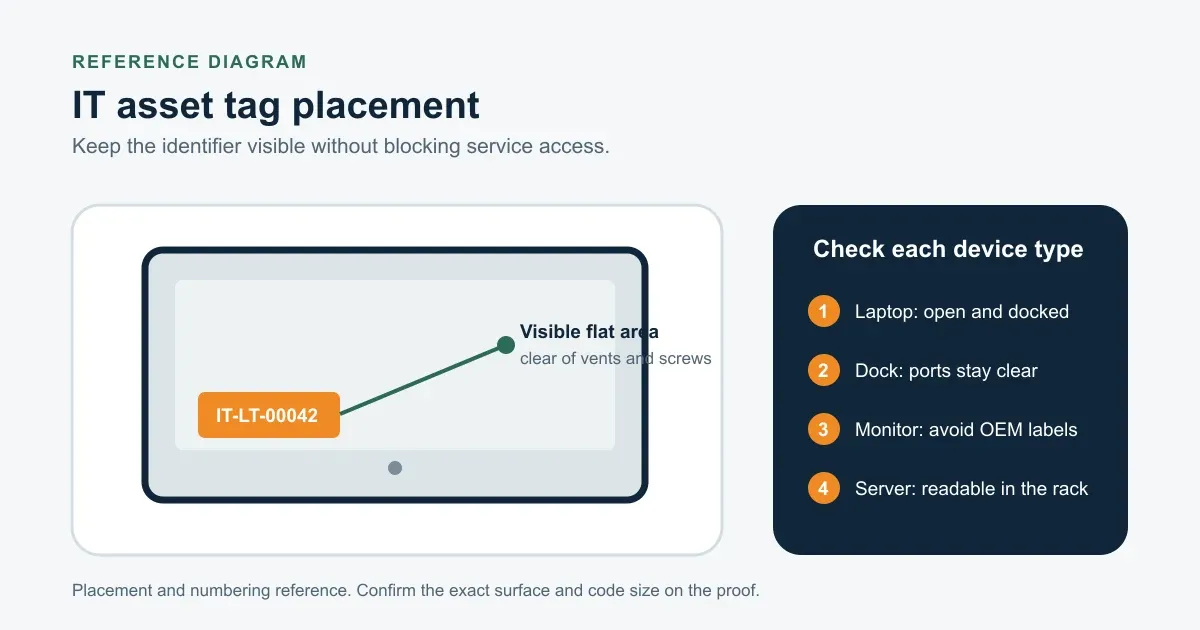
IT asset tagging starts with two decisions: where the identifier can stay visible for the life of the device, and how that identifier connects to the asset record.
A label that blocks a vent or sits on a removable cover creates service problems. A code that the support team cannot read creates a data problem. Solve placement and lookup before choosing the final material or size.
Plan placement by device type
| Device | Starting location | Keep clear |
|---|---|---|
| Laptop | A stable flat panel that remains with the chassis | Vents, ports, hinges, screws, regulatory labels and removable covers |
| Dock | A visible face that can be read while the dock is installed | Cable ports, release mechanisms and mounting interfaces |
| Monitor | A rear housing area that stays accessible during an audit | Vents, stand or VESA mounting points, controls and OEM labels |
| Server or network device | A fixed chassis area visible in the rack or during service | Airflow, drive bays, latches, handles and removable modules |
Check the position with the laptop open and docked, with cables connected, and with the monitor or server in its normal installed position. The location should remain readable without moving equipment in a way that creates risk.
Use a stable asset number
The visible number should identify the record, not describe a model that may change. A structure such as IT-LT-00042 can separate a device class from a fixed sequence while preserving leading zeros.
Keep the number short enough for manual entry. Do not reuse retired numbers unless the asset-management policy explicitly requires it. Later purchases can continue the sequence without changing the identifiers already in service.
For the data file, use one row per device and keep the asset ID, encoded value and visible text in separate columns. The spreadsheet preparation guide shows the handoff structure.
Match the code to the lookup workflow
Use a barcode when the service desk or audit team already works with scanners and a defined symbology. Use a QR code when staff need a compatible phone or 2D imager to open an asset or support record. The barcode, QR code and RFID comparison explains the workflow differences.
Print a human-readable asset ID with either code. It gives staff a fallback when the code is damaged, covered, too small for the available scanner or linked to a record they cannot access.
Choose material after placement is known
Polyester asset tags provide a low-profile adhesive path for suitable indoor device surfaces. Anodized aluminum tags provide a metal face in the current catalog. A compact 0.5 x 1.5 in aluminum barcode asset tag is one current 8 mil reference when the workflow uses a 1D barcode and the device has enough flat area. Tamper-evident tags can show an attempted removal, depending on the selected Product, but they do not prevent theft.
Test painted metal, coated plastic, texture and sensitive finishes before a full run. Send photos of the planned location with the RFQ when the surface or removal policy is uncertain.
What to include in the RFQ
List the device groups, quantity, planned location, maximum tag size, material preference, code type, data file and any removal requirement. Add close surface photos for laptops or housings with texture, curves or limited flat area. The digital proof confirms the layout; a physical sample is the safer check for surface fit and adhesion.
Frequently asked questions
- Where should an IT asset tag be placed?
- Use a stable, visible part of the device housing that stays with the asset. Keep the tag clear of vents, ports, hinges, screws, regulatory labels, removable covers and other service access points.
- Should IT use a barcode or QR code?
- Use the code your audit and support workflow can read. A barcode fits an established scanner process. A QR code can open a web record from a compatible phone or 2D imager. Keep a visible asset ID for manual lookup.
- Can one tag size be used for every IT device?
- Not always. Laptops, docks, monitors, adapters and servers have different flat areas and service constraints. Check each device group before approving one size for the whole deployment.