Tool and Maintenance Equipment Asset Tags: Planning Guide
Decide whether to identify a cabinet, tool set, individual tool or portable maintenance asset, then plan placement, data and mounting.
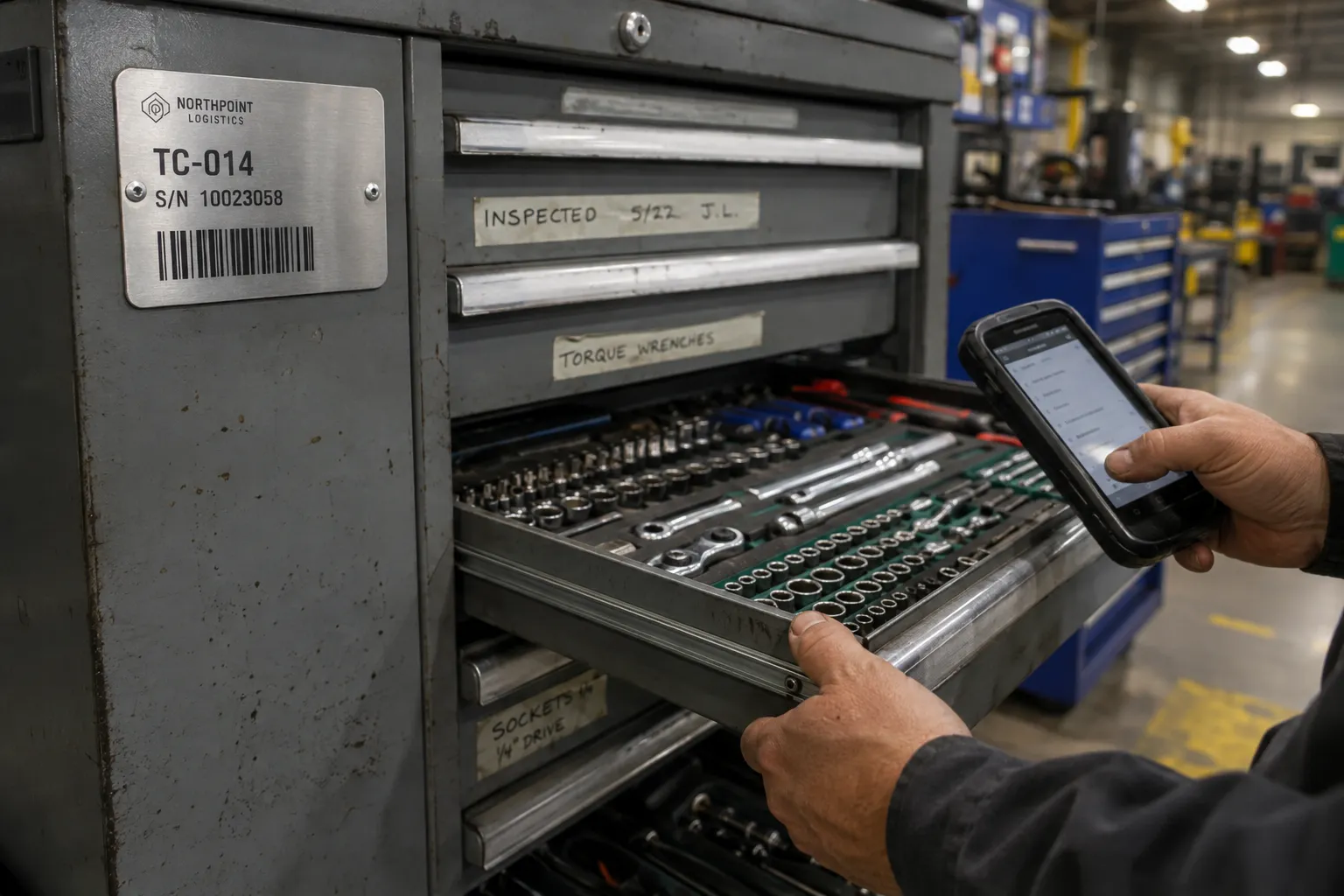
Application snapshot
Tool and maintenance tracking snapshot
Set the tracking level first, then match the code, placement and mounting to the way technicians use and return the asset.
Selected customer brands
These approved logos are separate from the planning image and parameters. No customer result is claimed here.




Parameters to confirm
Send the measured conditions and source data with the RFQ. The written quote and Proof confirm the final Product, specification and price.
- Tracking level
- Cabinet, drawer, kit, position, portable asset or individual tool, based on the custody or maintenance record.
- Placement
- A stable readable area clear of grips, controls, service panels, moving joints, calibration labels and wear zones.
- Code workflow
- Barcode or QR format, check-out device, expected reading distance and a visible asset ID.
- Record fields
- Asset ID, department, custody record and encoded value. Keep changing inspection dates in the system.
- Surface and size
- Flat or curved surface, coating, texture, available area and a photo with a size reference.
- Handling exposure
- Oil, cleaning, abrasion, impact, heat and repeated hand contact at the proposed position.
- Starting materials
- 304 stainless steel, anodized aluminum or brass, subject to the available area and operating conditions.
- Mounting
- Adhesive on a tested surface or approved holes where the Product and asset design allow mechanical mounting.
Tool and maintenance tagging begins with the tracking level. A cabinet, drawer, tool set, meter and individual hand tool are separate assets only when the maintenance or custody record treats them separately. Decide that first. Otherwise the project can produce hundreds of IDs that staff do not use.
Next, choose a readable location that does not interfere with the tool, cabinet or equipment. The tag size and material follow the available area, surface, cleaning and handling conditions.
Decide what staff will check out, inspect or return
A single cabinet tag can identify the cabinet, department or complete tool set. It does not identify every socket, wrench or instrument inside. If the system records individual tools, each item needs a unique ID and a location that remains readable through normal use.
Group the assets before numbering:
- fixed cabinets and benches;
- drawers, bins or shadow-board positions;
- portable meters and powered equipment;
- reusable tool cases or kits;
- individual tools that have enough suitable tag area.
Use one stable ID for each tracked record. Location, current custodian, inspection status and next due date can change. Keep those values in the maintenance or check-out system instead of printing them as permanent text unless the business process requires a separate replaceable label.
Match placement to wear and service access
The easiest place to see a tag may also be the place that receives the most contact. Inspect the asset in use, in storage and during cleaning.
| Asset | Placement starting point | Confirm before the Proof |
|---|---|---|
| Tool cabinet or bench | Fixed face or frame that remains with the cabinet | Drawer travel, handles, locks, cleaning, available area and scan direction |
| Drawer or storage position | Front area that stays visible when the drawer is closed | Whether the drawer can be replaced or moved and how the location is recorded |
| Portable meter or powered tool | Stable housing clear of controls, vents and service panels | Curves, texture, heat, impact, cleaning and removal policy |
| Tool case or kit | Area that remains with the complete kit | Stacking, transport abrasion, latches and the difference between kit ID and item IDs |
| Individual hand tool | Low-contact area that does not affect grip or function | Minimum readable size, shape, curvature and whether the current catalog has a suitable format |
Avoid grips, cutting or striking faces, moving joints, high-wear edges, calibration labels, controls and removable covers. A tag should not make the tool harder to use or hide information that technicians already need.
Small tools need an honest size check. A long URL, dense barcode and several lines of text may not fit the available area. Reduce the printed content or use a shorter record key before shrinking the code past what the intended device can read.
Build the code around the custody record
A barcode suits a check-out station that already uses scanners and a defined symbology. A QR code can open a permitted maintenance, inspection or ownership record from a compatible phone or 2D imager. A short visible asset ID helps when the code is damaged or the system is unavailable.
Keep the permanent tag focused on stable information:
- asset or tool ID;
- organization or department text, when approved;
- barcode or QR value;
- short ownership or return instruction, if it fits the layout.
Changing inspection dates, calibration status, custodian names and storage assignments usually belong in the record. If a visible due-date label is required, plan it as a separate replaceable element rather than crowding the permanent asset ID.
Use one spreadsheet row per tag. Preserve leading zeros and keep the printed asset ID separate from the encoded value. The Excel and CSV guide explains the handoff, while the barcode and QR comparison helps match the code to the reader.
Choose a Product from the actual asset and surface
The current Property ID Tags Category includes 304 stainless steel, anodized aluminum and brass plate starting points. Equipment Asset Tags add options for portable or fixed maintenance equipment where the operating conditions drive the choice. Fixed Asset Tags support asset-register workflows across different asset types.
These links do not mean one tag fits every tool. Send the available area, surface and handling conditions. Adhesive needs a suitable clean contact area. Mechanical mounting requires an approved location and hole pattern, and it may not be practical on a small tool.
An ownership ID can support audits and check-out records. It does not prevent theft. If removal evidence is required, describe the expected behavior and surface so the quote can confirm whether a current tamper-evident Product is suitable.
Planning example: cabinet and tool-set control
The image on this page shows a serialized barcode plate on a cabinet while a technician views a record on a handheld device. That plate identifies the cabinet or tracked set shown in the record. It does not prove that every tool in the drawer has an individual tag.
The Northpoint Logistics mark is fictional. The image is not evidence of a customer, completed deployment or maintenance result.
Send the tracking level with the RFQ
Split the request by asset group. Cabinet tags, portable equipment tags and individual tool IDs may need different sizes or mounting methods even when they share one numbering system.
Include:
- asset groups and quantity for each group;
- whether the ID represents a cabinet, kit, position or individual item;
- maximum tag area and surface photos;
- material, coating, curvature and cleaning method;
- code type, reader and expected scan distance;
- visible text and ownership wording;
- numbering structure, leading zeros and spare ranges;
- adhesive, hole-mount or other approved installation preference;
- heat, oil, abrasion, impact or repeated handling conditions that need review.
Use a sample request when the surface is curved, coated, textured, small or exposed to repeated contact. The written quote and Proof confirm the final Product, layout, mounting and price before production.
Evidence basis
This A0 guide uses current catalog and application-planning information. It does not report a customer project, theft reduction, tool-return rate or service-life result. Factory and quality-control evidence is maintained on the manufacturing, quality control and evidence pages.
Frequently asked questions
- Should I tag the tool cabinet or every tool?
- Choose the tracking level used in the maintenance record. A cabinet tag identifies the cabinet or stored set. Individual tools need their own IDs only when the custody, inspection or replacement process tracks them separately.
- Where should a tool asset tag be placed?
- Use a stable area that stays visible but avoids grips, working faces, moving joints, high-wear edges and service access. Check the available flat area and cleaning method before selecting size or mounting.
- Can an asset tag prevent tool theft?
- An ID can support ownership marking, check-out records and audits, but it does not prevent theft. Tamper-evident behavior depends on the selected Product and surface and must be confirmed before ordering.