Asset Tags for Manufacturing Equipment: Planning Guide
Plan the identifier, mounting location, code workflow and RFQ inputs for conveyors, machinery, fixtures and other production equipment.
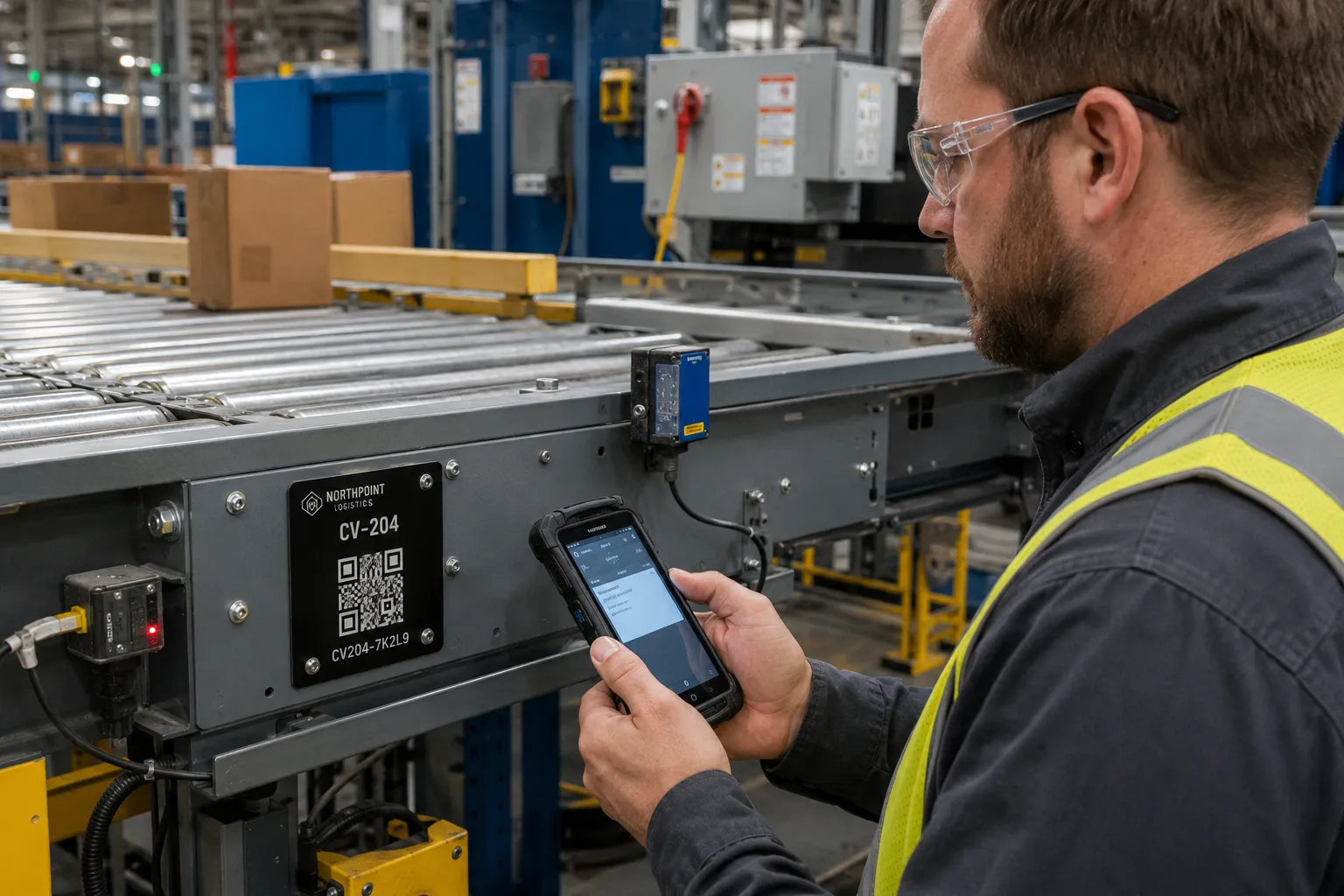
Application snapshot
Manufacturing equipment specification snapshot
Use this as the first RFQ pass for conveyors, machine frames, control cabinets, fixtures and production cells.
Selected customer brands
These approved logos are separate from the planning image and parameters. No customer result is claimed here.



Parameters to confirm
Send the measured conditions and source data with the RFQ. The written quote and Proof confirm the final Product, specification and price.
- Asset scope
- Conveyors, machine frames, control cabinets, fixtures, production cells and replaceable modules.
- Record structure
- Stable asset ID, plus a parent asset when the line or equipment hierarchy must be preserved.
- Surface and area
- Flat or curved surface, coating, available width and height, viewing angle and a close installation photo.
- Code workflow
- Barcode or QR format, scanner or device, expected reading distance and a visible serial for manual lookup.
- Mounting
- Adhesive on a tested contact area, or approved holes and fasteners with the complete hole pattern.
- Operating exposure
- Measured heat, cleaning agent, chemical contact, abrasion, impact, vibration and outdoor exposure.
- Starting materials
- 304 stainless steel or anodized aluminum. The measured conditions determine the quoted specification.
- Variable data
- Asset ID, parent asset, encoded value and printed text in separate spreadsheet columns.
A manufacturing equipment tag should connect one physical asset to one stable record. Start with the machine, conveyor, fixture or panel that needs an ID. Then confirm where staff will read it, how the code will be scanned and whether the mounting location is exposed to cleaning, heat, abrasion, impact or vibration.
Material comes later. A metal plate may be a useful starting point, but the final choice depends on the measured conditions and the mounting method approved for that asset.
Define the equipment record before the plate
Decide what the identifier represents. A complete conveyor, a control cabinet, a removable motor, a fixture and a production cell are different records. The plate should remain with the item named in the asset register.
Use one stable asset ID across the visible text, barcode or QR value and the maintenance record. Avoid printing changing information such as the current operator, service status or next inspection date on a permanent plate. Those fields belong in the system reached by the code.
For a production line, record the relationship between parent and child assets before numbering begins. A line may have one main ID and separate IDs for motors, drives, guarding assemblies or replaceable modules. The data file should make that hierarchy clear rather than forcing it into a long printed description.
Review the tag location with the people who service the asset
The visible area in a product photo is not always a safe or useful installation point. Check the equipment in its normal operating and maintenance positions.
| Location condition | Starting decision | Confirm before the Proof |
|---|---|---|
| Fixed machine frame with a clear flat area | Place the ID where staff can read or scan it without removing a cover | Surface finish, available width and height, viewing angle and scan distance |
| Removable guard, door or access panel | Confirm that the panel stays with the asset record | Service procedure, replacement risk and whether a fixed frame location is better |
| Curved, textured, oily or coated housing | Do not assume an adhesive will fit | Surface photo, cleaning method, contact area and a sample test on the actual surface |
| Mechanical mounting is approved | Use a Product with listed hole-mount options | Hole count, diameter, center spacing, fastener and clearance behind the surface |
| Area near movement, heat or repeated contact | Move the tag to a protected readable position | Maximum measured condition, abrasion path, impact risk and access for scanning |
Keep the plate clear of controls, vents, warning labels, service instructions, hinges and parts that move during operation. The final location should not create a maintenance step just to read the ID.
Match the code to the production or maintenance workflow
A code is useful only when the team has a defined way to read it. Use a barcode when the site already has a scanner process and a selected symbology. Use a QR code when authorized staff need to open an equipment or maintenance record from a compatible phone or 2D imager.
Print a short human-readable ID with either code. Dirt, damage, glare or access permissions can interrupt scanning; the visible ID gives staff a manual lookup path.
Code size depends on the encoded data, scanner, viewing distance and available plate area. A long URL or dense barcode may require a larger tag. The barcode, QR and RFID comparison explains the workflow differences. Use the Excel and CSV data guide to separate the asset ID, encoded value and printed text into clear columns.
Use catalog materials as starting points
The current Industrial Asset Tags Category includes 304 stainless steel, anodized aluminum and engraved metal options. The Equipment Asset Tags Category provides another path when the equipment location, plate size or mounting choice is the main decision.
These Categories are starting points, not blanket performance promises. State the actual temperature, cleaning agent, chemical contact, outdoor exposure, abrasion, impact and vibration in the RFQ. The written quote and Proof confirm the offered Product, material, thickness, marking and mounting details.
Adhesive and hole-mount choices vary by Product. An adhesive-backed plate needs a suitable surface and enough contact area. A plate with holes still needs the complete hole pattern and approved fastener details. The installation guide covers surface preparation and sample testing without assuming one method fits every machine.
Planning example: conveyor equipment ID
The image on this page shows a QR plate fixed to a conveyor frame and scanned from a working position. It illustrates several useful questions: Can the operator reach the code? Will the plate stay with the conveyor? Is the frame surface suitable for the proposed mounting? Does the QR value open the correct record, and is the visible ID short enough for manual entry?
The sample mark in the image is fictional. It does not document an order, installation result or customer relationship.
Send the manufacturing details with the RFQ
Include the equipment list and one row per tag. Add the visible asset ID, encoded barcode or QR value, printed text and any parent asset reference in separate columns. Photos should show the full machine and a close view of the proposed tag location.
Also send:
- maximum tag width and height;
- quantity and number range;
- preferred material or appearance, if already specified;
- surface material, coating and cleaning method;
- adhesive or mechanical mounting preference;
- hole drawing when position is fixed;
- measured operating and cleaning conditions that affect the tag;
- scanner type, expected distance and code format.
Request a sample when the surface, size, code density or mounting location is uncertain. The sample checks physical fit. The digital Proof checks layout, text, code content and hole position before production.
Evidence basis
This A0 guide uses the current IronMarks catalog, application-planning data and RFQ process. It does not report a customer project or a tested service limit. Factory and quality-control information is maintained separately on the manufacturing, quality control and evidence pages.
Frequently asked questions
- What information should I send for a manufacturing equipment tag quote?
- Send the equipment type, tag location, available area, quantity, material preference, code and visible text, mounting method, surface photo and the actual heat, cleaning, chemical, abrasion, impact or vibration conditions that need review.
- Should a machine tag use adhesive or mounting holes?
- Use only a mounting method listed for the selected Product. Adhesive needs a suitable clean contact area. Holes, screws or rivets need an approved location, hole pattern and clearance behind the surface.
- Is a barcode or QR code better for production equipment?
- Use the code supported by the maintenance or production record. A barcode fits a defined scanner workflow. A QR code can open a permitted web record from a compatible phone or 2D imager. Keep a visible asset ID for manual lookup.